Entropic State
VIEWPOINT // Camera Engine v0.9.7.0 Beta

A from-scratch camera engine for GTA V: every camera rebuilt with procedural physics, a reactive PostFX shader stack, and live in-game tuning. Save any setup as a shareable preset.

The only way to get VIEWPOINTWindows 10/11VirusTotal-scanned ↗
Beta · available nowLegacy + Enhanced editionsReactive PostFX · D3D11 + D3D12Works with NVE · QuantV · ReShade · ENBPart of the Entropic Pass
Camera Systems/8 of 8 online

Eight cameras.
One engine.

Every camera was rebuilt as its own physics rig and shader stack, with procedural recoil, procedural head-bob, and a Stress System that turns heart rate into aim noise, camera shake, and FOV pulse. Switch live, tune live, save it as a preset. Select a feed to inspect it.

Chase Cam/Featured

Feel Every Corner

REC 00:47:13CHASE CAM
DEPTH DeepCLASS VehiclesFEED CAM_01

An orbital chase camera driven by procedural G-force physics. It leans into corners, shudders over rough road, and snaps back on impact. Speed-reactive FOV widens on the straights and tightens under braking, and free-look lets you orbit the car mid-drive.

01G-Force PhysicsACTIVE
02Collision ResponseACTIVE
03Speed-Reactive FOVACTIVE
04Orbital Free-LookACTIVE
DeepTuning
depth
Shader Stack/7+ effects

Shaders that react.

A built-in PostFX pipeline that reacts to the game in real time: speed, collisions, suppression, health, and combat aim all push the look. Run it on top of your graphics mod, or on its own.

● SHADER PASS7+ EFFECTS

In the stack

  • Motion Blur
  • Chromatic Aberration
  • Film Grain
  • Focus Hunting
  • Scanlines
  • Dynamic Lens Border
  • Speed Effects
  • & More
Reacts to →
SpeedCollisionsSuppressionHealthCombat Aim

A separate PostFX pass: stack it on ReShade, ENB, NVE, or QuantV, or run it alone. D3D11 and D3D12 both supported.

In-Game UI

Tune live.
Switch live.

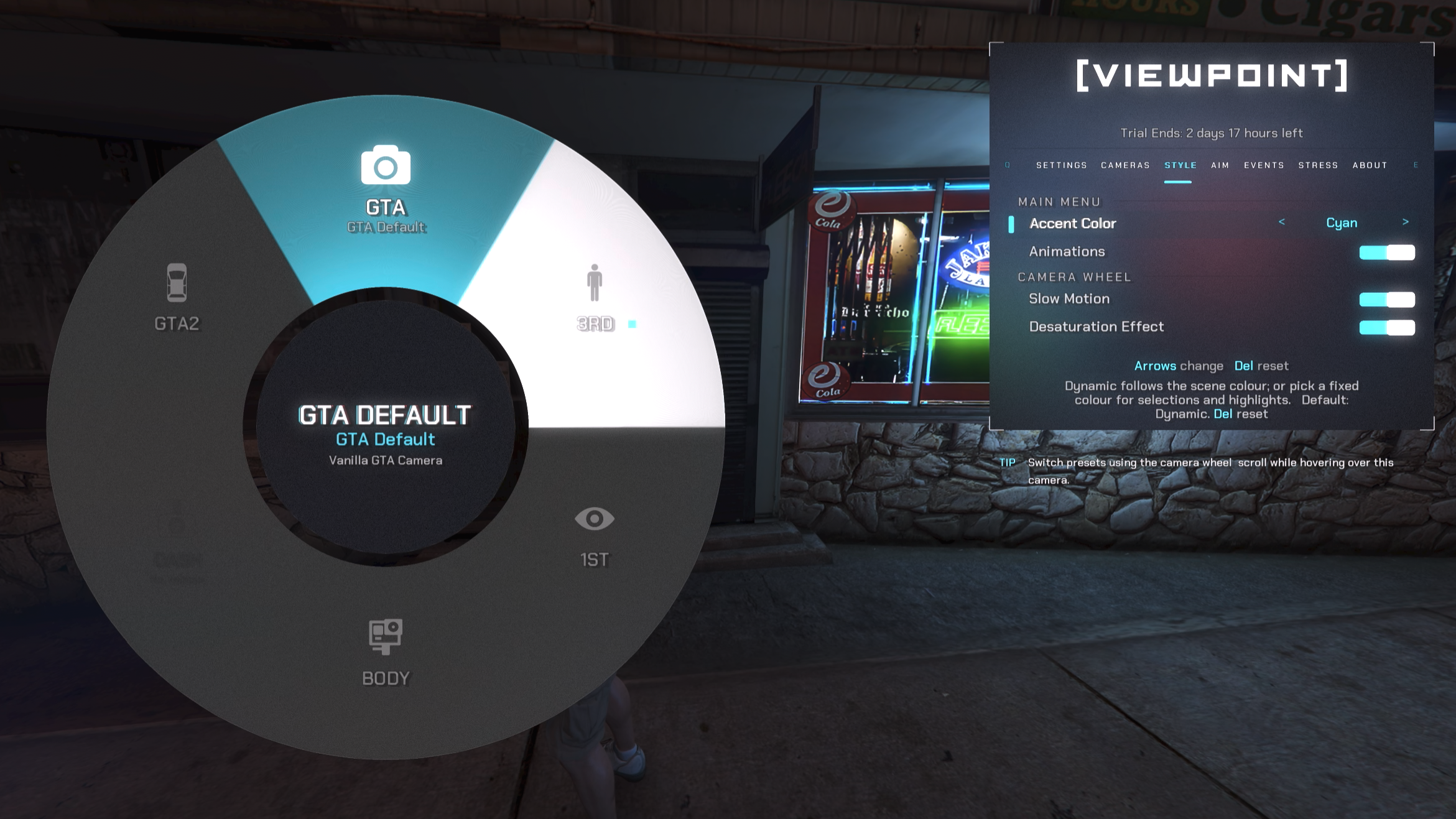
The whole interface was rebuilt from scratch: custom menus, a new Camera Wheel, and a settings layout that makes the depth approachable. Open it while the camera is live without losing control of your keyboard, mouse, or controller, and watch every change apply instantly. No more open-menu-close-menu loops.

VIEWPOINT in-game UI: custom menus and the Camera Wheel
LIVE PREVIEW
Presets

Save it.
Share it.

Every setup saves as a shareable JSON preset. Each camera ships sensible defaults (BODYCAM, for instance, comes with Helmet, Chest, and Shoulder presets) so you can clone one and make it yours. Trade them in the dedicated Discord channel.

Every preset captures

  • Attachment source & position
  • Rotation & physics
  • Overlay text & elements
  • Shader configs
  • Recoil configs
  • Head-bob configs
Unlimited presetsJSON · shareableDiscord library
Helmet Cam.json
{
  "name": "Helmet Cam",
  "description": "Head-mounted camera with natural head movement",
  "author": "VIEWPOINT",
  "camera": "BodycamCamera",
  "readOnly": true,
  "settings": {
    "attachmentBone": 31086,
    "baseOffsetX": 0.18,
    "maxFOV": 60.0,
    "reticle": true,
    "springHz": 8.0,
    "recoilIntensity": 1.0,
    "overlay": true,
    "overlay.recEnabled": true,
    "grainIntensity": 0.08,
    "chromaticIntensity": 0.15,
    "onfoot.suppression.intensity": 1.0,
    // …plus border, head movement & reaction FX
  }
}
Roll Camera

Shoot it yourself.

Free 3-day trial of VIEWPOINT via the Mod Manager: no Patreon account, no payment info, and fully standalone (it never modifies your game files).

+ Standalone install, clean uninstall+ Dependencies handled for you+ Windows 10/11+ Public VirusTotal scan ↗